


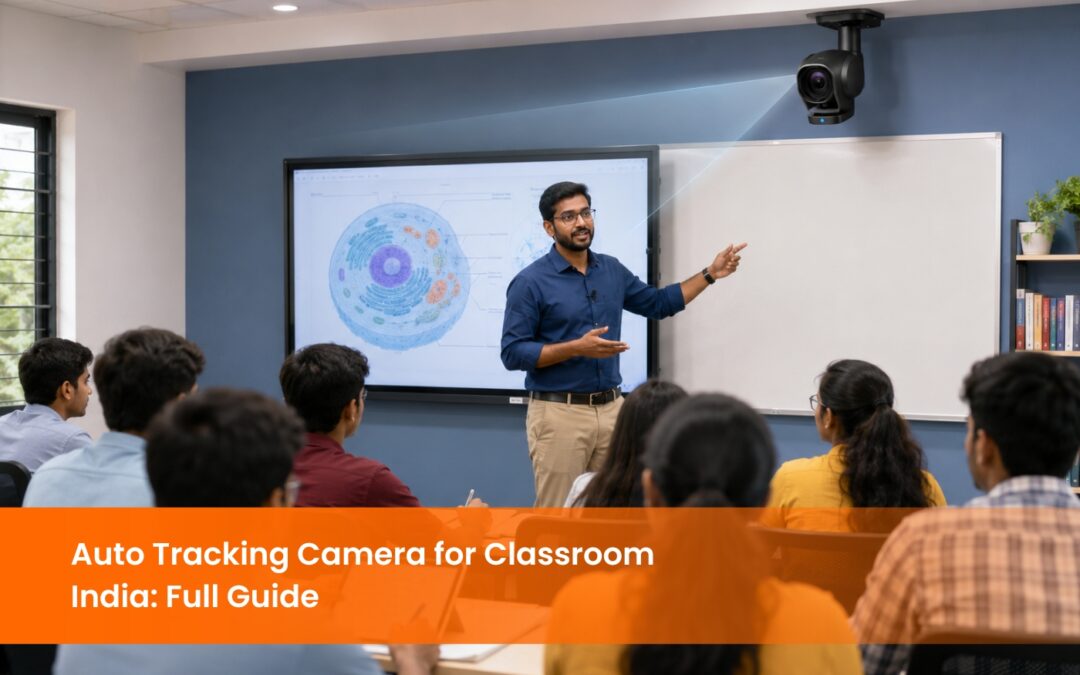
Auto Tracking Camera for Classroom India: How PTZ Technology Is Changing the Way Schools Record and Stream Lessons
The auto tracking camera for classroom use in India has shifted from a specialist broadcasting tool to a standard infrastructure component in universities, engineering colleges, and hybrid-ready schools. The reason is straightforward: hybrid learning is now a baseline expectation, not an upgrade. When a teacher moves around a 40-seat classroom during a live session, a fixed webcam mounted above the interactive flat panel captures only a static wide shot of the front wall. Remote students on the video call see the board but lose the teacher the moment she steps away from the podium. An auto-tracking PTZ camera solves this at the hardware level; it follows the active presenter automatically, keeps them in frame, and delivers a broadcast-quality view to every remote participant without requiring anyone to operate the camera during the lesson. This guide covers how auto tracking cameras work, what specifications matter for Indian classroom environments, how they connect to recording and streaming systems, and what to look for before buying.
What Is an Auto Tracking Camera and How Does It Work in a Classroom?
PTZ stands for Pan, Tilt, Zoom. A PTZ camera is a motorised camera that can rotate horizontally (pan), move vertically (tilt), and zoom in on subjects without physically moving the camera body. In a classroom, the camera is mounted at the back or side of the room and controlled either manually via a remote or automatically via an AI tracking system.
Auto tracking is the AI layer on top of PTZ hardware. The camera uses computer vision algorithms to detect a moving subject, typically the teacher, and continuously adjusts its pan, tilt, and zoom to keep that subject centred in the frame. When the teacher moves to the right side of the board, the camera follows. When she steps back to address the full class, the camera zooms out to a wider shot. When a student stands to ask a question, some systems switch automatically to track the new active speaker based on audio localisation.
This automation is what makes the auto-tracking camera for classroom India deployments genuinely practical. A school cannot assign a camera operator to every hybrid session. The camera needs to function independently, and the teacher needs to teach without thinking about the camera at all.
The VC-TR61N from EIS TechInfra is an auto-tracking PTZ camera designed specifically for education and conference environments. It uses AI-powered subject tracking to follow the presenter automatically, supports Full HD output, and connects to the room’s display, recording unit, and video conferencing platform via HDMI and USB without requiring a dedicated camera controller.
Why Do Indian Classrooms Need an Auto Tracking Camera for Hybrid Lessons?
Hybrid learning in India is driven by two converging pressures. The first is NEP 2020’s explicit mandate for blended learning across all education levels, which requires institutions to deliver content to both in-room and remote students simultaneously. The second is the post-pandemic expectation from students and parents that recorded lessons are available for revision, regardless of whether the institution officially operates a hybrid model.
A standard classroom video conferencing setup uses a fixed webcam. In a room with 30 students and a teacher who moves between the board, the demonstration table, and the student rows, a fixed webcam produces a recording where the teacher disappears from frame for significant portions of the session. Remote students miss transitions between content areas. Students reviewing the recording for an exam find it difficult to follow when the teacher’s position and the content being discussed are out of sync.
An auto-tracking camera for classroom India use eliminates this problem. The recording captures the teacher’s movement naturally, the way a human camera operator would frame it, without the cost or logistics of a dedicated operator for every session.
For institutions running UGC-mandated distance education programmes or NAAC-accreditation documentation requirements, auto-tracking camera recordings also produce cleaner archival material: consistent framing, stable audio, and clear visual continuity from session start to finish
What Specifications Matter When Buying an Auto Tracking Camera for Classroom Use in India?
Not all PTZ cameras with auto tracking perform equally in an Indian classroom environment. Here are the specifications that determine real-world classroom performance.
Resolution and frame rate are the first considerations. Full HD 1080p at 30 frames per second is the minimum specification for a classroom recording that plays back clearly on student devices. 4K resolution at 30fps produces higher-quality archival content and is the appropriate specification for institutions planning to share recordings externally, use them for accreditation, or stream to large audiences.
Tracking accuracy and latency matter more than any spec sheet number. An auto-tracking camera that reacts slowly to the teacher’s movement produces jerky, disorienting footage where the camera is always catching up to where the teacher already was. The VC-TR61N uses AI tracking algorithms that maintain smooth, predictive movement; the camera anticipates the direction of movement rather than reacting after the fact.
The field of view determines how much of the classroom the camera can cover at its widest zoom setting. A wider field of view is essential in Indian classroom environments where rooms are often longer than they are wide and the teacher may move across a significant horizontal distance during a lesson. A minimum horizontal field of view of 70 degrees at wide angle is appropriate for a standard classroom.
Connectivity is the third critical specification. The camera needs to output via HDMI or USB 3.0 to connect to the classroom’s recording unit or laptop. IP network connectivity via Ethernet allows the camera to be controlled and monitored remotely, which is important for institutions managing multiple classrooms from a central AV operations point.
Noise level matters in a recording environment. A PTZ camera with loud motor movements produces audible tracking noise in audio recordings, particularly in rooms with sensitive microphone setups. The VC-TR61N operates with low-noise motor movement that does not interfere with classroom audio capture.
Specifications are easier to weigh side by side than in isolation. The full Lumens camera range spans PTZ, box and document cameras, which makes it straightforward to see where tracking accuracy and optical zoom actually differ between models.
How Does an Auto Tracking Camera Connect to a Classroom Recording and Streaming Setup?
An auto tracking camera for classroom use in India is most effective when integrated with the room’s full AV system rather than operated as a standalone device.
The camera output connects to the lecture capture unit via HDMI or USB. The lecture capture unit, such as the UC9040 or LC2001 from EIS TechInfra, records simultaneously from the camera feed and the teacher’s presentation screen (via HDMI from the IFPD or laptop), producing a split-screen or picture-in-picture recording that shows both the teacher and the content being discussed.
For live streaming, the camera output routes through a streaming encoder that pushes the feed to Zoom, Google Meet, Microsoft Teams, or a dedicated streaming platform such as YouTube Live. In a hybrid classroom, the auto tracking camera feed appears as the primary video input for remote participants, while the teacher’s screen content is shared via the video conferencing platform’s screen share function.
For institutions running multi-camera setups in larger lecture halls or auditoriums, a video matrix switcher routes between the auto tracking camera, a wide-angle overview camera, and a document camera, allowing the recording to cut between angles automatically or via a room operator.
The VC-TR61N integrates directly with the UC9040 recording unit and standard video conferencing platforms without requiring proprietary software or additional hardware controllers. Installation is handled by EIS TechInfra as part of the supply engagement, with full system integration testing before handover.
The camera is one half of the capture chain. Matching it to the right lecture recording solutions determines whether you get a clean, indexed recording in the LMS or a raw file someone has to process manually after every class.
Auto Tracking PTZ Camera vs Fixed Webcam: Which Is Right for Indian Schools?
Indian institutions frequently evaluate auto tracking PTZ cameras against standard fixed webcams when budgeting for hybrid classroom infrastructure. Here is a direct comparison.
Factor
Auto Tracking PTZ Camera
Fixed Webcam
For Indian schools and colleges with rooms of 20 students or more, a fixed webcam is insufficient for genuine hybrid delivery. The auto tracking camera for classroom India use is the appropriate specification for rooms of this size upward.
What Are the Installation Requirements for an Auto Tracking Camera in an Indian Classroom?
Installation of an auto tracking camera for classroom India use requires four things: a suitable mounting position, power and data connectivity, integration with the room’s AV system, and initial tracking calibration.
The mounting position is the most critical variable. The camera should be mounted at the back of the classroom, centred on the teaching wall, at a height of 2.2 to 2.5 metres. This position gives the camera a clear line of sight to the full teaching area, including the interactive flat panel, the whiteboard or demonstration area, and the space immediately in front of the first student row. A side-wall mount is acceptable in rooms where the back wall is not accessible, but it introduces a slight angle that affects the symmetry of the wide-angle shot.
Power is supplied via a standard 5V or 12V DC adapter, depending on the model. Data connectivity uses a single Ethernet cable for IP control and network integration. The HDMI or USB 3.0 cable runs from the camera to the lecture capture unit or laptop.
Tracking calibration involves defining the tracking zone, the area of the classroom the camera should cover, and setting the zoom boundaries so the camera does not zoom in too close when the teacher is near the front of the room. This calibration takes approximately 30 minutes and is performed by the EIS TechInfra installation team at handover.
For institutions in Tier 2 and Tier 3 cities where power fluctuations are common, a UPS protecting the camera and recording unit is a recommended addition to the installation scope.
Conclusion
The auto-tracking camera for classroom use in India represents the practical solution to the hybrid learning requirement that NEP 2020 has made mandatory across Indian educational institutions. It removes the camera operator from the equation, produces consistent broadcast-quality recordings, and integrates seamlessly with the lecture capture and video conferencing systems that modern classrooms already use. EIS TechInfra Solutions supplies, installs, and supports auto tracking PTZ cameras across India, with full classroom AV integration and AMC coverage. Explore our auto tracking camera for the classroom range to find the right model for your institution.
Stay updated with the latest news, insights, and exclusive content by following us.
FAQ
What is an auto tracking camera for classroom use, and how is it different from a regular webcam?
An auto tracking camera uses AI to follow the teacher’s movement automatically, keeping them in frame throughout the lesson. A regular webcam captures a fixed angle only. In a classroom where the teacher moves between the board, demonstration area, and student rows, a webcam misses significant portions of the session.
What resolution should an auto tracking camera have for a school or college classroom?
Full HD 1080p at 30 frames per second is the minimum specification for classroom recording that plays back clearly on student devices. Institutions using recordings for NAAC documentation, external sharing, or streaming to large audiences should specify 4K resolution at 30fps.
Can an auto tracking camera also record lectures for students to review later?
Yes. The camera output connects to a lecture capture unit that records simultaneously from the camera feed and the teacher’s presentation screen. The resulting recording shows both the teacher and the content being discussed, which students can access after the session for revision and exam preparation.
How does an auto tracking camera support NEP 2020 compliance for Indian schools?
NEP 2020 mandates blended and hybrid learning capability across all education levels. An auto tracking camera enables institutions to deliver live hybrid sessions and maintain a searchable archive of recorded lessons, both of which are required components of a NEP 2020-compliant digital classroom infrastructure.
How long does it take to install an auto tracking camera in a classroom?
A standard single-classroom installation takes half a day: mounting, cabling, AV system integration, tracking zone calibration, and a handover test with the teacher. Multi-classroom rollouts are typically planned at four to six rooms per day, depending on cabling complexity and room accessibility.
What is PTZ, and why does it matter for classroom recording in India?
PTZ stands for Pan, Tilt, Zoom. A PTZ camera can rotate horizontally, tilt vertically, and zoom in on subjects using motorised controls. In a classroom, this means the camera can follow the teacher across the full teaching area and zoom in on board content without anyone operating it manually during the lesson.
How does an auto tracking camera connect to Zoom or Google Meet for hybrid classes?
The camera connects to a laptop or desktop via USB 3.0, or to a streaming encoder via HDMI. Once connected, it appears as a standard camera input in Zoom, Google Meet, or Microsoft Teams. The auto-tracking function operates independently of the conferencing platform and requires no additional software.
What is the ideal mounting position for an auto-tracking camera in an Indian classroom?
Mount the camera at the back of the classroom, centred on the teaching wall, at a height of 2.2 to 2.5 metres. This gives the camera a clear line of sight to the full teaching area. Side-wall mounting is acceptable where back-wall access is restricted, but slightly affects the symmetry of wide-angle shots.
What is the difference between optical zoom and digital zoom in a PTZ camera?
Optical zoom uses the camera’s physical lens to magnify the image without loss of quality. Digital zoom crops and enlarges the existing image, reducing resolution as the zoom level increases. For classroom use, an optical zoom of 10x or above is the appropriate specification for a clear, usable image when zoomed in on board content from the back of the room.
What after-sales support should Indian institutions ask for when buying an auto tracking camera?
Ask for a minimum one-year warranty covering camera hardware and tracking software, an Annual Maintenance Contract with on-site response within 48 hours, and confirmation of local technician availability in your city. Remote diagnostics capability from the supplier’s support team is a useful addition for campuses in Tier 2 and Tier 3 locations.