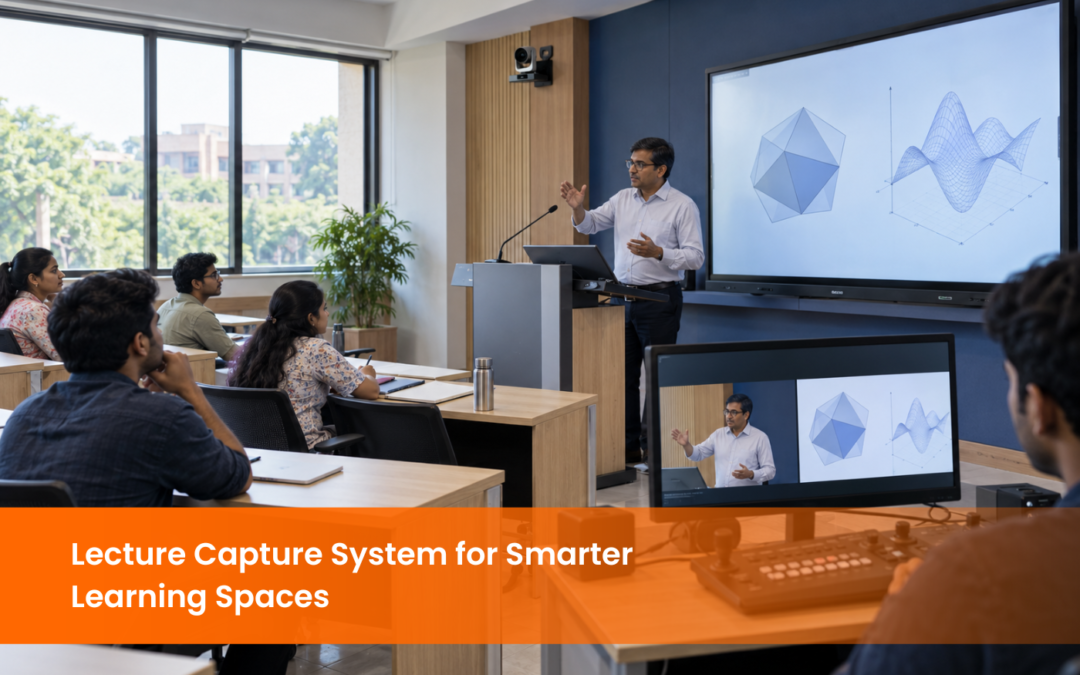



Lecture Capture System
For colleges, universities, training centres, and professional institutions, a Lecture Capture System helps extend learning beyond the classroom. Students can revisit lectures, review complex topics, and access course content when required, while faculty can continue teaching through familiar classroom workflows.
When planned as part of a smart learning environment, lecture capture can work alongside digital podiums , interactive displays, microphones, cameras, and classroom AV systems.
Why Does a Lecture Capture System Matter in Smarter Learning Spaces?
A Lecture Capture System connects the physical classroom with digital learning. A lecture delivered in the room can become an organised digital resource that students can access later.
Institutions may use lecture capture for:
● Regular classroom recording
● Blended and hybrid learning
● Revision and exam preparation
● Faculty training
● Professional certification programmes
The system should remain simple for instructors while making recorded content easy for students to find.
What Should a Lecture Capture System Record?
A Lecture Capture System may record the instructor’s voice, camera video, presentation slides, computer screen, interactive display, document camera, or multiple sources together.
Audio quality is especially important because explanations form a major part of most lectures. Microphone placement and room acoustics should therefore be considered during planning.
For larger lecture halls, camera presets or automated framing can also help keep the instructor visible while teaching.
How Does LMS Integration Improve Lecture Capture?
A Lecture Capture System integrated with a Learning Management System can connect recordings to the relevant course, class, or module. This helps instructors organise content and allows students to find recordings without moving between multiple platforms.
Depending on the setup, LMS integration may also support scheduled publishing, captions, access controls, search, and content organisation.
Institutions using Moodle, Canvas, Blackboard, or other platforms should check compatibility before selecting the system.
How Are AI Features Making Lecture Capture More Useful?
A modern Lecture Capture System may include automated transcription, captions, searchable speech, intelligent indexing, or chapter creation. These features can help students locate a particular concept inside a longer recording.
Automated camera framing can also support teaching spaces where instructors move around the room.
Institutions should evaluate these features based on teaching requirements, language support, accessibility needs, and existing digital infrastructure.
What Makes a Lecture Capture System Easy for Faculty to Use?
University guidance on the benefits of auto-recording lectures , also shows how scheduled capture can make recorded sessions easier to manage while giving students more flexibility to revisit course content.
A practical Lecture Capture System should clearly show when recording is active and which sources are being captured.
When recording controls are integrated with the classroom AV system or digital podium, instructors can follow a consistent workflow across different teaching spaces.
How Should Institutions Plan a Lecture Capture System?
Important factors include:
● Classroom size and teaching style
● Camera and microphone requirements
● Presentation sources
● LMS compatibility
● Storage and content retention
● Captioning and accessibility
● User permissions
● Faculty training
● Future expansion
A smaller classroom may need a straightforward setup, while a large lecture hall may require multiple cameras, professional audio, central controls, and automated scheduling.
The goal is to ensure that the Lecture Capture System fits naturally into the teaching environment.
How Does Lecture Capture Work with Digital Podiums and Classroom AV?
A digital podium can bring together the instructor’s computer, microphone, presentation sources, and classroom controls. The Lecture Capture System can then record these sources during the teaching session.
Interactive displays can contribute annotations, classroom cameras can capture the instructor, and microphones provide clear speech. Once recorded, the content can be made available through the institution’s learning platform.
This creates a more connected workflow for both faculty and students.
Conclusion
The right system should match the institution’s classroom size, teaching style, AV infrastructure, LMS environment, and content requirements.
If your institution is planning a smart classroom or upgrading existing teaching spaces, explore our Lecture Capture System solutions to understand how
available through EIS TechInfra Solutions. . can support integrated recording and classroom AV requirements.FAQ
What is a Lecture Capture System used for?
What can be recorded during a lecture?
How do automated captions help recorded lectures?
Can a Lecture Capture System connect with an LMS?
Does lecture capture support hybrid learning?
to classroom content after the session for revision, flexible study, and reinforcement of key topics.
Can lecture capture work with a digital podium?

Follow Us
Head Office Address
#311, 60ft Road, Thalakaveri Layout, Amruthahalli Main Road, Sahakara Nagar Post, Bengaluru-560092

Copyright ©2024 EIS TechInfra Solutions, All Rights Reserved. Designed by Fablesquare