

Video Switcher for Live Streaming
For corporate events, classrooms, auditoriums, houses of worship, product launches, and training sessions, a video switcher for live streaming gives the production team greater control over what viewers see at every stage of the event.
The right setup should match the number of sources, output quality, streaming platform, production style, and level of control required.
Why Is a Video Switcher Important for Live Streaming?
A video switcher for live streaming allows an operator to move from a wide camera shot to a close-up, presentation slide, guest speaker, or another source during the same broadcast.
This makes it useful for:
● Conferences and panel discussions
● Corporate town halls
● Live classroom sessions
● Training programmes
● Worship services
● Product demonstrations
● Hybrid events
The switcher becomes the control point that brings the different parts of the production together.
How Many Video Inputs Should You Look For?
A small setup may use two cameras and one laptop feed. A larger event may include several cameras, presentation systems, media players, and remote participants.
It helps to plan for both current requirements and future expansion. Choosing enough inputs gives the production team flexibility when additional cameras or content sources are introduced later.
Input type also matters. Depending on the setup, sources may arrive through HDMI, SDI, USB, or IP-based video.
Why Do Preview and Program Outputs Matter?
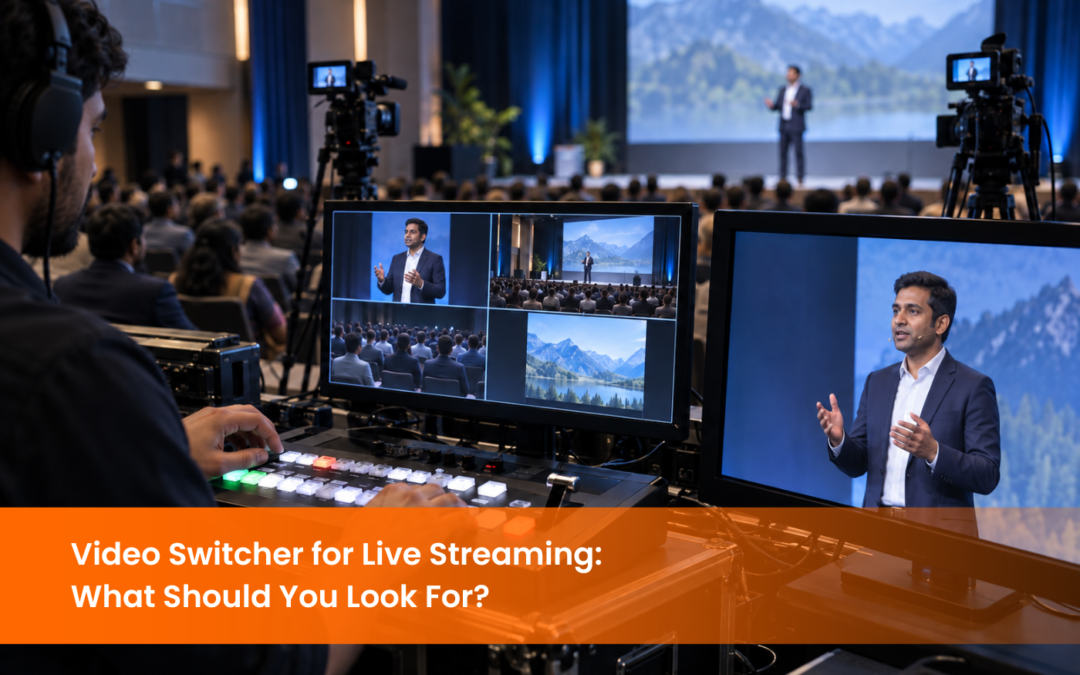
Preview allows the operator to prepare the next source, while the program output shows the content currently being broadcast. A video switcher for live streaming with a clear preview workflow helps operators manage camera changes and content transitions more confidently.
Multiview monitoring can also be useful in multi-camera setups because it lets operators view several sources on a single screen. This gives the operator a clearer picture of the complete production.
What Switching and Layout Features Are Useful?
A modern video switcher for live streaming may support picture-in-picture layouts, split-screen views, title overlays, logos, background graphics, and preset scenes.
For example, a panel discussion may use a wide shot for the full group, a close-up for individual speakers, and a split-screen layout when a presentation is being discussed.
Preset scenes make these layouts easier to recall during a live session and can help maintain a consistent visual style throughout the production.
How Important Is Audio in a Video Switching Setup?
A video switcher for live streaming may receive audio through cameras, microphones, mixers, or embedded video signals. The selected setup should make it easy to keep the correct audio source active as the visual production changes.
For conferences and training events, the audio workflow may involve several microphones and presentation sources. Planning this connection alongside the video switching system helps create a more coordinated live production.
The switcher should therefore be considered as part of the wider AV setup rather than as an isolated device.
How Does a Video Switcher Connect to a Streaming Platform?
Some production systems combine switching, recording, and streaming functions within one device. Other setups send the video switcher’s final output to a separate encoder for live streaming.
The encoder prepares the video and sends it to platforms such as YouTube Live or another supported streaming service. Consider resolution, frame rate, bitrate, internet bandwidth, and platform requirements when planning this stage.
Streaming platforms also provide recommended live encoder settings . for resolution, frame rate, bitrate, and video encoding, which can help teams configure the final stream output more effectively.
Testing the complete workflow before an event also helps the production team confirm that video, audio, graphics, and streaming settings are working together as intended.
Should Recording Be Included Alongside Live Streaming?
A video switcher for live streaming can be part of a setup that records the final program output while the event streams. Some systems can also record individual camera feeds separately for editing later.
This is particularly useful for conferences, lectures, training sessions, interviews, and events where the content may later be published as short clips or added to an internal media library.
When recording is required, consider storage capacity, file formats, and post-production requirements during system planning.
.How Should You Choose a Video Switcher for Live Streaming?
Consider:
● Number and type of video inputs
● Required output resolution
● Number of cameras
● Preview and multiview requirements
● Picture-in-picture and scene layouts
● Audio integration
● Recording requirements
● Streaming platform compatibility
● Ease of control
● Future expansion
A corporate town hall with three cameras and presentation content has different requirements than a classroom stream or a large auditorium production.
The right switcher gives the operator enough control while fitting naturally into the rest of the AV and streaming setup.
.How Does a Video Switcher Fit into a Complete AV Setup?
In a multi-camera event, PTZ cameras may provide different viewing angles while presentation content arrives from a laptop. The switcher brings these sources together and creates the final program feed.
That output can then be recorded, streamed, displayed locally, or distributed to other AV systems depending on the requirement.
Planning these technologies together creates a more consistent production workflow and makes the system easier for operators to manage.
Conclusion
The right choice depends on input requirements, switching features, audio integration, recording, output quality, streaming compatibility, and future expansion. Considering the full production environment helps ensure the switcher works effectively with the cameras, audio systems, and streaming platform already in use.
If you are planning a multi-camera production or upgrading an existing streaming setup, explore our video switcher for live streaming solutions to understand how EIS TechInfra Solutions . can support integrated recording and streaming requirements.
FAQ
What is a video switcher for live streaming?
How many inputs should a video switcher have?
Can a video switcher record while live streaming?
Why do I need a video switcher for multi-camera streaming?
Can a video switcher show two sources at the same time?
Does a video switcher work with PTZ cameras?

Follow Us
Head Office Address
#311, 60ft Road, Thalakaveri Layout, Amruthahalli Main Road, Sahakara Nagar Post, Bengaluru-560092

Copyright ©2024 EIS TechInfra Solutions, All Rights Reserved. Designed by Fablesquare